Example: pandas
Run pandas under DAGZ in a Docker image with dagz, Postgres, and MariaDB pre-installed.
Docker is required on macOS (the pytest plugin is Linux-only) and optional on Linux.
Prerequisites
Install the zb runtime and start the local daemon on the host:
curl -LsSf https://dagz.run/install.sh | bash
zb daemon up --bg
Allow containers to reach the daemon
Enable listen_on_docker_bridge in ~/.dagz/local.env/daemon.yaml, then restart the daemon:
zb daemon up --bg --restart
See the daemon config reference for the listen keys.
Clone pandas
git clone https://github.com/pandas-dev/pandas.git
cd pandas
Parallelizing DB tests
For the -m db slice (MySQL + Postgres), see Parallelizing DB Tests for the rerouting API.
Save this file as dagz_autoload.py at the pandas repo root (/pandas/dagz_autoload.py):
from dagz.integ.psycopg import PG_CONFIG
from dagz.integ.pymysql import MYSQL_CONFIG


def setup_adbc_driver():
    """Custom ADBC driver rerouting using DAGZ rerouting framework."""
    import adbc_driver_postgresql.dbapi
    _orig_adbc_connect = adbc_driver_postgresql.dbapi.connect

    def _override_connect(uri, *args, **kwargs):
        uri = PG_CONFIG.maybe_reroute_uri(uri)
        return _orig_adbc_connect(uri, *args, **kwargs)

    adbc_driver_postgresql.dbapi.connect = _override_connect


def setup_parallel_db():
    import dagz.integ.psycopg2
    import dagz.integ.pymysql

    PG_CONFIG.configure(
        rewrite_db_name=PG_CONFIG.default_rewrite_db_name,
        should_reroute=PG_CONFIG.default_should_reroute,
        worker_init=dagz.integ.psycopg2.create_worker_init(["pandas"], host="127.0.0.1", port=5432, user="postgres", password="postgres"),
        prepare=None,
    )
    MYSQL_CONFIG.configure(
        rewrite_db_name=MYSQL_CONFIG.default_rewrite_db_name,
        should_reroute=MYSQL_CONFIG.default_should_reroute,
        worker_init=dagz.integ.pymysql.create_worker_init(["pandas"], host="127.0.0.1", port=3306, user="root", password=""),
        prepare=None,
    )


def init(in_pytest):
    setup_parallel_db()
    setup_adbc_driver()
DAGZ discovers dagz_autoload.py at the repo root and calls its init(in_pytest) function before it loads any test code, so the driver hooks are active before collection.
The file runs only under DAGZ, so it needs no import guard and has no effect on plain pytest runs.
Build the image
Save the Dockerfile below in the pandas checkout root:
# syntax=docker/dockerfile:1
FROM ubuntu:24.04

ENV DEBIAN_FRONTEND=noninteractive

RUN apt-get update && apt-get install -y --no-install-recommends \
    postgresql mysql-server \
    build-essential ninja-build curl git ca-certificates \
    python3 python3-dev python3-venv \
    zsh vim \
    libgl1 libglib2.0-0 libfontconfig1 tzdata tzdata-legacy \
    && rm -rf /var/lib/apt/lists/*

RUN sh -c "$(curl -fsSL https://raw.githubusercontent.com/ohmyzsh/ohmyzsh/master/tools/install.sh)" "" --unattended

# Init PostgreSQL (password + database)
RUN pg_ctlcluster 16 main start \
    && su postgres -c "psql -c \"ALTER USER postgres WITH PASSWORD 'postgres'\"" \
    && su postgres -c "createdb pandas" \
    && pg_ctlcluster 16 main stop

# Init MySQL (TCP root access for pymysql + database). Pandas's fixtures
# connect to host=localhost; reverse DNS in the container resolves the
# client IP back to 'localhost', so we grant on both 127.0.0.1 and localhost.
# MySQL 8 defaults root@localhost to auth_socket; drop and recreate with
# mysql_native_password so pymysql/TCP clients can authenticate.
RUN mkdir -p /var/run/mysqld && chown mysql:mysql /var/run/mysqld \
    && mysqld_safe & \
    while ! mysqladmin ping --silent 2>/dev/null; do sleep 0.1; done \
    && mysql -e "\
      DROP USER IF EXISTS 'root'@'localhost'; \
      CREATE USER 'root'@'localhost' IDENTIFIED WITH mysql_native_password BY ''; \
      CREATE USER IF NOT EXISTS 'root'@'127.0.0.1' IDENTIFIED WITH mysql_native_password BY ''; \
      CREATE USER IF NOT EXISTS 'root'@'%'         IDENTIFIED WITH mysql_native_password BY ''; \
      GRANT ALL ON *.* TO 'root'@'127.0.0.1' WITH GRANT OPTION; \
      GRANT ALL ON *.* TO 'root'@'localhost' WITH GRANT OPTION; \
      GRANT ALL ON *.* TO 'root'@'%'         WITH GRANT OPTION; \
      CREATE DATABASE IF NOT EXISTS pandas; \
      FLUSH PRIVILEGES" \
    && mysqladmin shutdown

RUN curl -LsSf https://astral.sh/uv/install.sh | sh
ENV PATH="/root/.local/bin:$PATH"

COPY --exclude=build \
     --exclude=**/*.so \
     . /pandas
WORKDIR /pandas
RUN uv venv /venv --seed --python 3.12
ENV VIRTUAL_ENV=/venv PATH="/venv/bin:$PATH"

# pandas's clipboard tests use pytest-qt's qapp fixture. Qt tries to talk
# to an active display using the xcb X11 client library. For running
# inside docker, we force the offscreen Qt backend.
ENV QT_QPA_PLATFORM=offscreen

RUN uv pip install -r requirements-dev.txt
RUN uv pip install -v -e . --config-settings=builddir=/build --no-build-isolation
RUN git config --global --add safe.directory /pandas


# Pre-install dagz-pytest's runtime deps so first container start is fast.
RUN uv pip install dagz

# Install the zb CLI (lands in /root/.local/bin, already on PATH).
RUN curl -LsSf https://dagz.run/install.sh | bash

COPY <<'EOF' /entrypoint.sh
#!/bin/bash
set -e

pg_ctlcluster 16 main start
mysqld_safe &
while ! mysqladmin ping --silent 2>/dev/null; do sleep 0.1; done
exec "$@"
EOF
RUN chmod +x /entrypoint.sh

ENV PATH=$PATH:/venv/bin

ENTRYPOINT ["/entrypoint.sh"]
CMD ["zsh"]
docker build -t dagz-pandas-demo:latest .
Requires Docker 23.0+ for COPY --exclude=.
Run the container
docker run -it --rm \
  --env DAGZ_URL=http://host.docker.internal:29111 \
  --add-host=host.docker.internal:host-gateway \
  -v "${PWD}:/pandas" \
  dagz-pandas-demo:latest
Run tests with DAGZ
Inside the container, the first run generates a baseline:
pytest --dagz
This will:
- Create a job you can inspect using the web UI at http://localhost:29111 or
zbCLI at real time. - Analyze pandas code
- Start a few parallel workers, based on your hardware.
- Collect code coverage and other runtime signals.
- Show testing progress
- Create DB per worker and route DB connections from workers to their assigned DB.
- Record a baseline for ~240k tests.
Subsequent runs select only the tests affected by your changes:
pytest --dagz --dagz-skip-redundant=1
A typical single-module edit selects hundreds to a few thousand tests.
Re-run historical commits with DAGZ
Commit your local integration so it survives git reset --hard:
git checkout -b dagz-integ
git add dagz_autoload.py
git commit -m "dagz integration"
Replay the last 20 commits, cherry-picking that integration onto each:
dagz git-replay -n 20 --run --skip-redundant \
    --branch origin/main \
    --cherry-pick dagz-integ
Note:
git reset --harddiscards uncommitted host changes. Commit or stash first.- Drop
--runfor a dry-run.
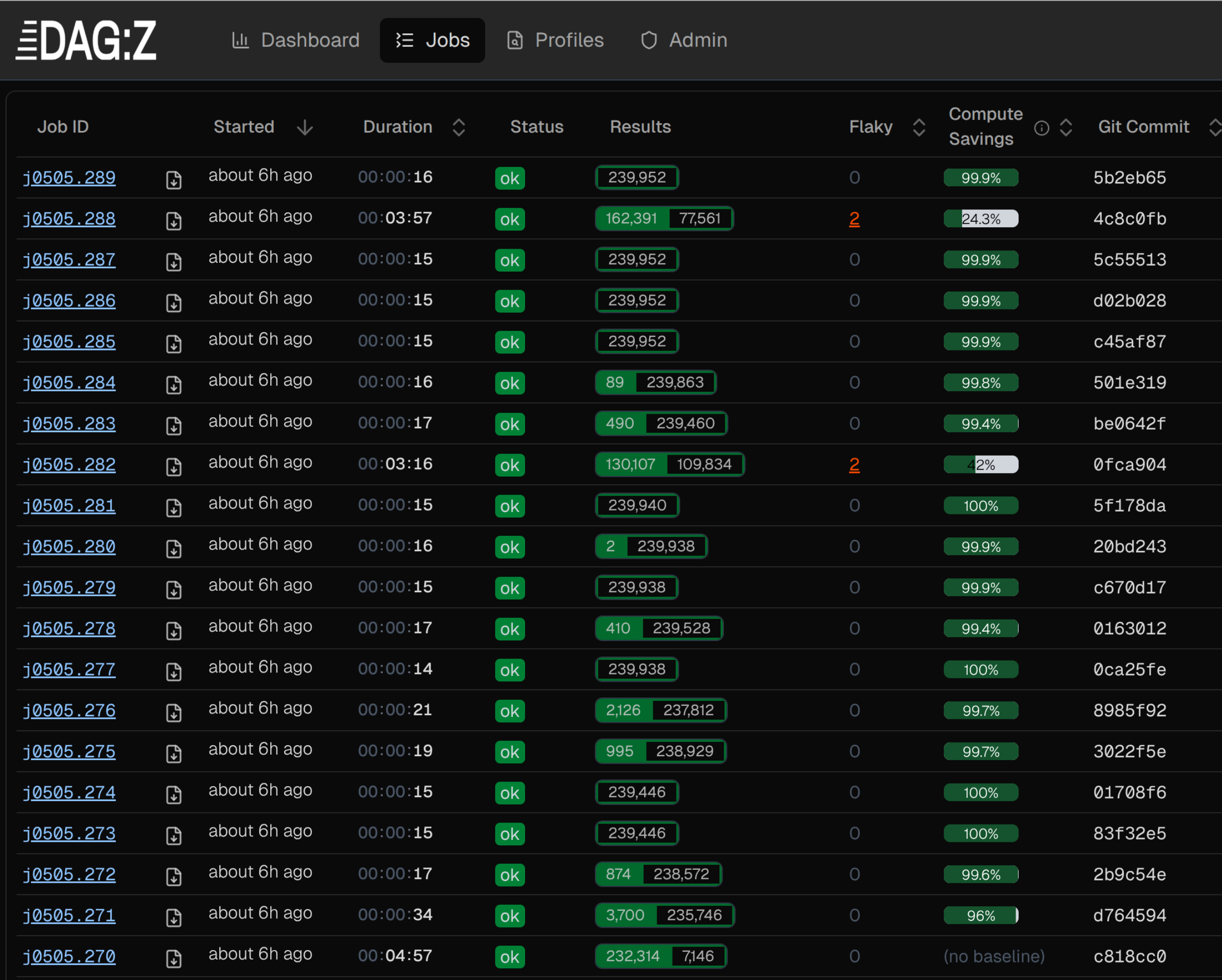
The Jobs view shows one row per commit:
Benchmarks
Head-to-head with pytest-xdist
Pandas suite (-m 'not db'), 6 workers, same machine. --dagz-no-bl disables selection so this isolates parallel runtime. xdist (cov) uses pytest-cov; DAGZ (no cov) uses --dagz-disable-sensors. CPU cycles sum P-core and E-core counters from perf stat. DAGZ rows show delta vs the corresponding xdist row.
| Configuration | Failed | Wall time | CPU time (user+sys) | CPU cycles (× 10¹²) | Peak memory |
|---|---|---|---|---|---|
| xdist (no cov) | 13 | 407.4s | 2232.3s | 9.06 | 14.5 GB |
| xdist (cov) | 3035 | 550.6s | 2829.8s | 9.30 | 14.2 GB |
| DAGZ (no cov) | 13 0% | 319.8s −22% | 1809.0s −19% | 7.13 −21% | 12.2 GB −16% |
| DAGZ (cov) | 13 −99.6% | 334.4s −39% | 1901.6s −33% | 7.60 −18% | 14.0 GB −1% |
pytest-cov adds 35% to xdist wall time and induces 3,035 errors (vs 13 without). DAGZ instrumentation adds 5%. Selection savings stack on top.
Measuring on your machine
For CPU and memory numbers, run pytest under perf stat and a transient systemd scope (Linux host only):
systemd-run --user --scope --unit=pytest-run -p MemoryAccounting=yes -- \
  bash -c 'env QT_QPA_PLATFORM=offscreen perf stat \
  docker run --rm \
    --env DAGZ_URL=http://host.docker.internal:29111 \
    --add-host=host.docker.internal:host-gateway \
    -v "${PWD}:/pandas" \
    dagz-pandas-demo:latest \
    pytest --dagz-no-bl --dagz-workers=6 pandas/tests/base ; \
  systemctl --user status pytest-run'
QT_QPA_PLATFORM=offscreen keeps Qt-backed tests headless. The trailing systemctl --user status prints peak memory. Swap pandas/tests/base for the slice you want.
Notes
- pandas Cython files (
.pyx/.pxd) are tracked as binary modules; changes trigger re-selection. - Tests requiring optional deps (
qapp,httpserver) error out unless installed. Unrelated to DAGZ.
Exporting coverage
After any pytest --dagz run, export a coverage report on the host:
zb export-cov --format pycoverage       # → .coverage (coverage.py-compatible SQLite)
zb export-cov --format xml              # → coverage.xml (Cobertura)
Accuracy:
- Semantic-unit coverage (DAGZ selection coverage) stays up-to-date even when only a subset ran.
- Line coverage (
zb export-covoutput) reflects only the chosen job. For a full-suite report, run with selection disabled and export from that job.
See Coverage: Two Modes of Coverage.
Measuring peak memory
Inside the container (cgroup v2):
before=$(cat /sys/fs/cgroup/memory.peak)
pytest --dagz pandas/tests/
after=$(cat /sys/fs/cgroup/memory.peak)
echo "Peak memory: $(( (after - before) / 1024 / 1024 )) MB"